NTFS MFT indexingLive file updatesContent searchKeyboard first
Built for real file systems
Search is only the beginning.
Filter, inspect, organize, transfer, archive, and open files from one focused workspace.
01
Search engine
Millions of paths. Zero waiting around.
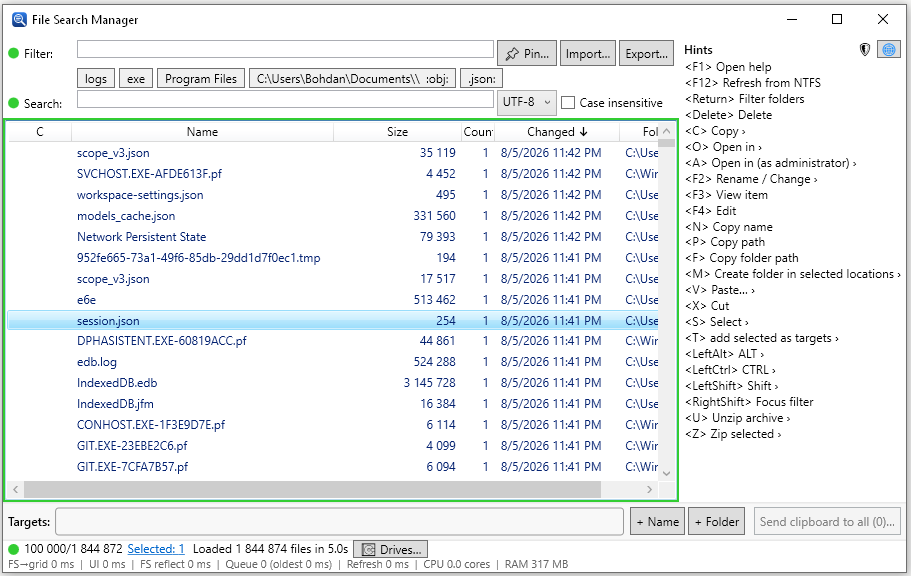
Read the NTFS Master File Table for a fast initial index, follow changes live, and fall back safely to a normal directory scan when needed.
1,843,989entries indexed
02
Content search
Look inside, not just at names.
Search UTF-8, UTF-16, case-insensitive text, or hexadecimal content within the files you already filtered.
UTF-8UTF-16HEX
03
File operations
Turn results into action.
Copy, move, link, recycle, drag, drop, extract, archive, and open with compatible applications—directly from your result list.
CopyMoveLinkArchive
04
Reusable workflows
Keep frequent searches one click away.
Pin named filters, save a target basket, and export everything as one portable settings file.
● Source files● Recent logs● Large archives
05
Live changes
Watch where an application writes.
Any file that changes after the initial index shows the time and size it has right now—even while the application still holds the file open—so sorting by Changed puts it on top.
● service.log · 14:07:52● cache.db · 14:07:51
06
Keyboard & mouse
Stay fast from first query to final action.
Rich selection controls, always-available shortcuts, sortable columns, and a complete help view keep advanced workflows discoverable.
CtrlCCopyF12Refresh indexF1Open help
From disk to done
Three steps. No detours.
The interface stays deliberately dense where it matters and gets out of your way everywhere else.